
Retirement Card Messages: What to Write and How to Design It
Choose retirement card messages that sound like you. Start with a kind wish, add one true detail when it fits, and sign from a person or team the recipient knows. Keep the main greeting short enough to read at a glance. Then plan the Front and Back around those words.
Adapt these original examples when you make a card for retirement.
What to put in a retirement card
A retirement card message needs three things: a greeting, a personal or professional note, and a clear sender. You can write “Happy retirement” on the Front and put a short thank-you or sign-off on the Back.
Before choosing the words, decide who is sending the card. A colleague can mention a shared project. A manager can thank the person for a specific contribution. A friend can use a warmer voice. A team message should use words everyone signing it can stand behind.
Use only details you know are true. Check names and avoid guessing about travel, family plans, money or why the person is retiring. When you do not know them well, a simple wish is enough.
Short retirement card messages by relationship
Choose a message for retirement card artwork from these Front and Back examples. Use a fitting pair, replace checked names, and add your sign-off.
| Relationship or tone | Front | Back |
|---|---|---|
| Simple and warm | Happy retirement, [Name]. | Wishing you good days ahead. With best wishes, [Sender]. |
| From a colleague | Thank you for being a great colleague. | I have enjoyed working with you. Best wishes for your next chapter. |
| From a team | Warm wishes on your retirement. | Thank you for all you have shared with our team. From everyone at [Team]. |
| From a manager | Thank you for your contribution. | Your work on [Project] made a difference. With best wishes, [Sender]. |
| For a mentor | Your guidance will stay with me. | Thank you for your patience and advice. Wishing you a happy retirement. |
| For a friend | Here’s to your next chapter. | I look forward to more good times together. With love, [Sender]. |
| Brief and formal | Best wishes on your retirement. | With sincere thanks and warm regards, [Sender]. |
| When you know them less well | Wishing you well as you retire. | It has been a pleasure working with you. Best wishes, [Sender]. |
Keep the lines about projects, advice or shared time only when they are true. If a message does not fit your relationship, remove that part rather than inventing a story.
Choose words for a retirement card that fit the tone
A happy retirement card can be cheerful without making assumptions. Use “Congratulations on your retirement”, “Enjoy your retirement” or “Wishing you a happy retirement” when the words suit the occasion. If the circumstances are private or uncertain, keep the wording gentle: “With warm wishes for the days ahead.”
Use humour only when you know the person will enjoy it. A light line such as “May your next diary have more room for the things you love” can work between friends. Skip jokes about age, health, being replaced or finally escaping work.
Read the message aloud before approving it. If you would not say it to the person, choose simpler words.
Give the Front and Back one clear job each
Let the Front carry the main wish. Use the Back for a short note and the sender. Leave space around the words so the message stays easy to read.
Try one of these layout ideas:
- Words first: A bold greeting on the Front, with a small sign-off on the Back.
- One quiet motif: A leaf, simple line or small star beside the greeting, repeated lightly on the Back.
- A personal reference: One motif linked to a real interest the person has shared, with a short note about it.
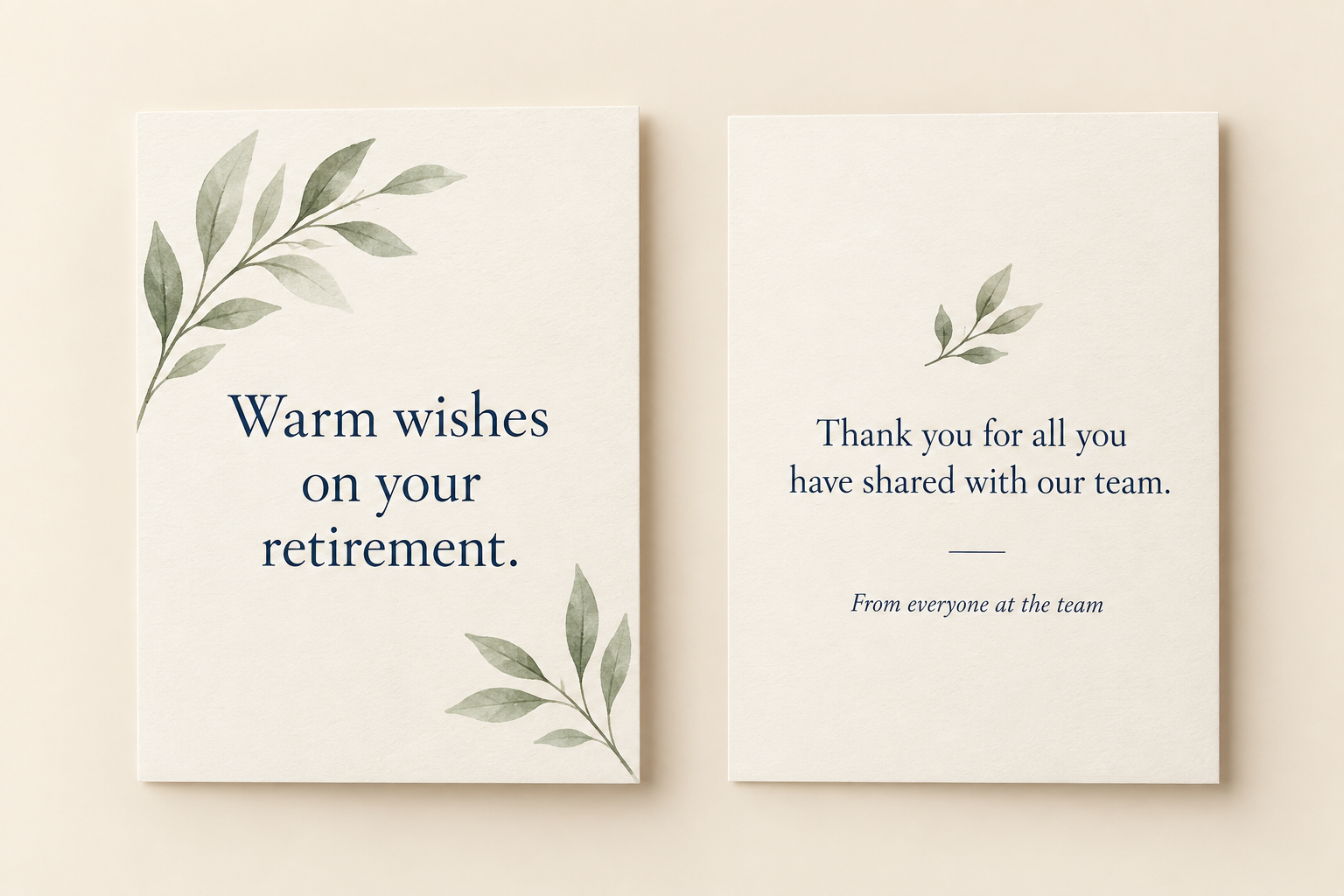
These are planning examples for separate surfaces. For a folded card, confirm the panel order and open dimensions separately. The greeting card size guide explains the measurements to check.
Make retirement card artwork in MARKFOLDS
MARKFOLDS creates coordinated Front and Back digital card artwork. Start with approved words, then use the custom card purpose to describe the design.
- Open the MARKFOLDS card workspace and sign in.
- Choose Others and describe the card type. For example: “A retirement greeting for a colleague, with a simple leaf motif and clear space around the words.”
- Add your sender or business details in the supported fields. Use one short approved greeting in Slogan, such as “Warm wishes on your retirement.”
- Review the available format and visual choices. Choose a readable palette and keep the greeting clear.
- Generate, inspect both sides, and revise the brief when needed before confirming the saved version.
The Slogan field allows up to 80 characters and is used when it fits the selected format. Check the actual artwork for omissions and spelling. For a longer note that must remain word for word, finish that text in a suitable layout tool.
For the wider workflow, see how to make your first MARKFOLDS card.
Check the card before you use it
Place the retirement message in card artwork with enough contrast and space to read it at the intended size. Check each name, the sender, line breaks and both surfaces in the order the person will see them. Inspect the downloaded file as well as the preview.
MARKFOLDS provides PNG and conditional SVG delivery. Use the export options shown for the saved design. For printed cards, arrange production separately and ask the chosen provider to approve the final file.
Frequently asked questions
Does MARKFOLDS have a retirement card preset?
MARKFOLDS has no dedicated Retirement preset. Choose Others and describe the card purpose. Review the generated result against your approved message.
Can I download the card as SVG?
SVG is available when the current plan and saved artwork show that option. Some visuals may not remain editable vectors. Check Product Facts and Pricing for current delivery details.
Does MARKFOLDS print or send the card?
MARKFOLDS creates digital artwork. You arrange sharing, printing and sending separately.
What can I write in a retirement card for my boss?
Thank them for one real contribution, then add a short wish. If they gave you helpful guidance, you could write: “Thank you for your guidance. With warm wishes for your retirement.” Sign from yourself or the team, and check that each detail is true.
Open the card workspace, choose Others and start with one short approved retirement greeting.